SMS Virtual - Receive SMS
- 4.5
- Rating
- 1.00M
- Installs
- Free
- Price

 Analysis by App-foxy
When I first opened SMS Virtual - Receive SMS, I understood its appeal quickly: it is built for people who need a temporary way to receive an SMS verification message online rather than use their personal number for every sign-up. That sounds simple, but the real value depends on using it for the right kind of task. I found it most useful as a practical communication tool for separating a one-time verification from my everyday phone activity, while still keeping expectations realistic about what a virtual number can and cannot replace.
The app is free to install and is made by Tecrow Apps. It is rated for Everyone, works on Android devices running version 6.0 or later, and the current version is 1.3.1. Its average score is 4.5 from around 73 thousand ratings, with roughly 2.5 thousand written reviews and more than one million installs. Those figures suggest that the basic idea is easy for many people to understand, but popularity alone does not make every verification request a good match for a virtual SMS service.
What to expect before you request a number
The first thing to understand is the app’s narrow purpose. This is not a replacement for your normal Messages app, a full calling service, or a private long-term phone line. I would approach it as a temporary inbox for verification texts. That makes it suitable for testing a service, creating a separate account for a short project, or keeping a personal number away from a website that only needs to send a confirmation code.
You May Also Like

 Blood Strike: 2.5 Anniversary
Blood Strike’s Loadouts Turn Every Drop Into a Tactical Gamble
A close look at Blood Strike’s custom loadouts: how fast access to signature weapons reshapes its battle royale rhythm, rewards preparation, and narrows the gap between fights.

 Pandora - Music & Podcasts
Pandora’s Music Is Easy to Start, but Harder to Recover
Pandora’s strength is its low-effort path from a seed to a station. Its weak spot is how much confidence it asks you to place in connection, setup, and quiet recovery.

 8 Ball Pool
 Is Built on Rivalries, Rematches, and Routine
A close look at the rivalries, rematches, shared routines, and unanswered safety questions that turn a quick pool match into a persistent mobile community.

 Samsung Music
’s Quiet Strength Is Playing What You Already Own
Its reach comes less from spectacle than from dependable access to a personal library. That simplicity is both the app’s strongest retention engine and its ceiling.

 AccuWeather: Weather Radar
AccuWeather Review: A Quick, Clear Forecast for Everyday Decisions
For everyday plans, the best forecast is the one you can understand quickly. AccuWeather makes rain timing, radar, and local conditions easy to act on, with a few trade-offs.

 Hill Climb Racing
Why Hill Climb Racing Still Turns Crashes Into One More Run
A tiny car, a bumpy hill and one more upgrade: Hill Climb Racing keeps resurfacing because its simple chaos makes every near-miss feel personal.
More From Our News Desk



That distinction matters because verification systems do not all treat virtual numbers equally. Some services accept them immediately, while others may reject a number, delay a message, or ask for another verification method. I would never use a temporary number as the only recovery route for an important account. If losing access would affect work, banking, health information, or years of personal messages, my safer choice would be a permanent number that I control directly.
The store summary describes the app as “SMS verification online,” and that is a fair way to frame it. The short description, “SMS Virtual,” is even more compact, so a first-time user should not expect a long explanation before starting. The useful mindset is to treat each number and incoming message as part of a specific task, not as a permanent identity.
One practical advantage is separation. I can keep a registration code away from my main inbox, avoid adding a short-lived service to my everyday number, and reduce the amount of clutter on my personal phone. This is especially handy when I am trying a platform that I may not continue using. It also helps when I need to distinguish a test account from my normal account during a small project.
The trade-off is control. A virtual number is not the same as a private SIM that remains in my possession. I would avoid sending sensitive information through it, avoid assuming that a number will remain available later, and never build an account recovery plan around a message I may not be able to receive again. That is not a flaw unique to this app; it is the central limitation of temporary SMS services.
Who will get the most from it
I think the strongest audience is a first-time user who needs one verification step and wants a straightforward alternative to exposing a personal number. It can also suit developers or testers who need to check a registration flow without mixing test messages with personal conversations. Someone managing several short-term sign-ups may appreciate the separation even more, provided the service being tested accepts virtual SMS.
I would be more cautious if you need dependable access over weeks or months. The app is not the right choice for a permanent business contact, a family number, or an account that requires repeated identity checks. People who need voice calls, rich messaging, reliable account recovery, or a number tied to their own carrier should look at a conventional mobile plan or a dedicated long-term virtual phone provider instead.
Getting from installation to the first useful result
After installing the app, I would begin with a very specific goal rather than opening the service I want to register with immediately. Decide which account or test needs the code, check whether that service allows virtual numbers, and keep the registration screen ready. This small preparation avoids the most common mistake: requesting a number first and only later discovering that the target service does not accept it.
The app is free, although it includes optional in-app purchases ranging from $0.49 to $2.99 per item. I would pay attention to the screen before confirming any purchase and use the free path first when it is available for my task. The presence of purchases means that “free” should be read as free to start, not as a promise that every possible number or use case will cost nothing.
Once inside, I would look for the area where a virtual number can be selected or activated, then choose one for the particular verification request. The exact labels may feel unfamiliar if this is your first virtual SMS app, but the workflow should be approached in a simple order: choose a number, enter it into the external service, return to the SMS inbox, and wait for the message to appear.
My advice is to copy the number carefully and keep the registration page open. A misplaced digit can look like a delivery failure when the real problem is that the external service sent the code somewhere else. If the message does not arrive immediately, I would first check the number, the country or region expected by the registration form, and whether the external service has accepted the request before trying again.
The first meaningful success is not merely seeing a number on screen. It is receiving the code and completing the external verification without losing track of which number belongs to which registration. I find that writing down a short note such as “test account” or “project sign-up” is surprisingly useful when several browser tabs or apps are open. It prevents the common confusion of entering a valid code into the wrong account.
A realistic everyday workflow
Imagine I am evaluating a new community platform for a short project. I do not want its one-time confirmation mixed into my personal messages, and I do not yet know whether I will keep the account. I would open SMS Virtual - Receive SMS, select a suitable number, enter it on the platform’s registration page, and watch the app for the incoming code. After entering the code, I would record the account details somewhere secure and avoid treating the temporary number as a future recovery method.
This workflow is useful because it separates the immediate verification from the longer-term decision. I can test the platform first and decide later whether it deserves a permanent account. The important discipline is to finish the sign-up while the number and message are available, rather than assuming I can return days later and retrieve the same SMS.
Where first-time users may get confused
The biggest source of confusion is the difference between an app problem and a rejection by the outside service. If a code does not arrive, that does not automatically mean the inbox is broken. The registration website may block virtual numbers, the message may be delayed, the selected number may already be unsuitable for that service, or the request may have expired. I would troubleshoot in that order instead of repeatedly pressing resend.
Repeated requests can make matters worse. Some websites limit how often a code can be sent, and multiple attempts may trigger a temporary block. My approach is to wait briefly, confirm the number exactly, and use one clear retry. If the service continues to reject the number, I would stop and use a different verification method rather than spending money on repeated attempts that cannot solve the underlying restriction.
Another point that deserves attention is privacy. A temporary SMS inbox should not be treated like a personal, confidential mailbox. I would never use it for passwords, private conversations, identity documents, or a recovery code for an account that matters. The app’s purpose is convenience during verification, not a guarantee that the number is exclusively mine forever.
It is also easy to forget that the external service controls the code. SMS Virtual - Receive SMS can only help receive a message that is actually sent to the selected number. It cannot correct an incorrect email address, unlock a blocked account, approve a registration that the website has refused, or make an expired code valid. Keeping that boundary in mind makes the experience much less frustrating.
Small habits that make the process smoother
Choose the target service before selecting a number, so the number is tied to a clear purpose rather than left unused.
Keep the registration page and the SMS inbox easy to switch between, especially when the code expires quickly.
Use one number for one short task whenever possible, which reduces the chance of entering a code into the wrong account.
Do not delete or abandon the account until you have decided whether you need a permanent recovery method.
Stop retrying when the outside service clearly rejects virtual numbers; another attempt may not change that policy.
These habits are more important than speed. The app can make receiving a verification message convenient, but it cannot remove the rules imposed by the website or app where the number is being used. In my experience, careful preparation produces a better result than repeatedly requesting new numbers without understanding the failure.
How it compares with ordinary alternatives
Compared with using my personal SIM, this app offers better separation for short-lived registrations. I do not have to place every unfamiliar service directly beside personal texts, and I can keep testing activity distinct from normal communication. The personal SIM is still stronger for ownership, continuity, account recovery, and situations where a service requires a carrier-linked number.
Compared with a full virtual phone service, SMS Virtual - Receive SMS is more focused. A broader provider may be preferable if I need calling, a persistent business identity, voicemail, or a number that I can keep for regular contact. This app makes more sense when the task begins and ends with receiving a verification message.
Compared with public online SMS websites, a dedicated mobile app can feel more convenient because the workflow stays on the phone where I am already completing the registration. However, I would still apply the same caution: public or temporary numbers are not appropriate for confidential verification. The convenience is real, but it should not be confused with exclusive ownership.
The optional purchases also affect the comparison. If I only need an occasional verification, starting with a free option may be enough. If a particular number or request requires payment, I would compare that one-time cost with the value of using my personal number or obtaining a permanent alternative. Spending a small amount is reasonable for a disposable test, but not if the service itself is incompatible with virtual SMS.
Questions I would answer before recommending it
Can a beginner use it without technical knowledge? Yes, if the goal is clear and the user understands the basic sequence: select a number, submit it to the outside service, then read the incoming code. The confusing part is usually not the app itself but the difference between a delayed message, an expired request, and a service that refuses virtual numbers.
Is it suitable for important accounts? I would say no. Even after a successful verification, I would replace the temporary number with a permanent recovery option whenever the account matters. A virtual SMS tool is best used at the beginning of a relationship with a service, not as the foundation of long-term access.
Will every verification message arrive? I would not assume that. Delivery depends on the destination service, the number selected, and the timing of the request. If the first attempt fails, check the basics once, then consider another route instead of treating repeated retries as a guarantee.
Do purchases make it a better choice than a normal phone number? Not automatically. Purchases may be worthwhile for a short task when convenience matters, but a normal carrier number remains the better option for stable ownership, recovery, and repeated communication. The right choice depends on whether the task is temporary or ongoing.
Does the Everyone rating mean it is appropriate for all uses? It indicates that the app is presented for a general audience, but responsible use still matters. I would keep private information out of temporary SMS workflows and follow the rules of the service where I enter the number.
My next-step recommendation
After the first successful verification, I would not immediately request another number just to explore. I would first confirm that the account works, save any important login details through a secure method, and decide whether the account needs a permanent phone number. If it does, change the recovery setup before the temporary SMS route becomes irrelevant or unavailable.
For a second use, I would choose a low-risk task such as a trial registration or a test account, not a service containing financial or personal records. That gives a new user a chance to learn how the inbox behaves, how quickly codes arrive, and how the external service handles virtual numbers without putting an important account at risk.
My overall impression is positive but deliberately limited. SMS Virtual - Receive SMS is most valuable when you need a quick separation between a one-time verification and your personal number. Tecrow Apps has positioned it in a clear communication niche, and the free starting point makes experimentation approachable. Still, I would recommend it only when you understand the temporary nature of the number and have a backup plan for anything important.
If your need is occasional SMS verification, the app is worth trying. If you want a dependable phone identity, private messaging, calls, or lasting account recovery, I would choose a conventional number or a full virtual phone service instead. That distinction is what turns SMS Virtual - Receive SMS from a risky shortcut into a useful, carefully managed tool.
FAQs for SMS Virtual - Receive SMS
01What is SMS Virtual - Receive SMS and how does it work?
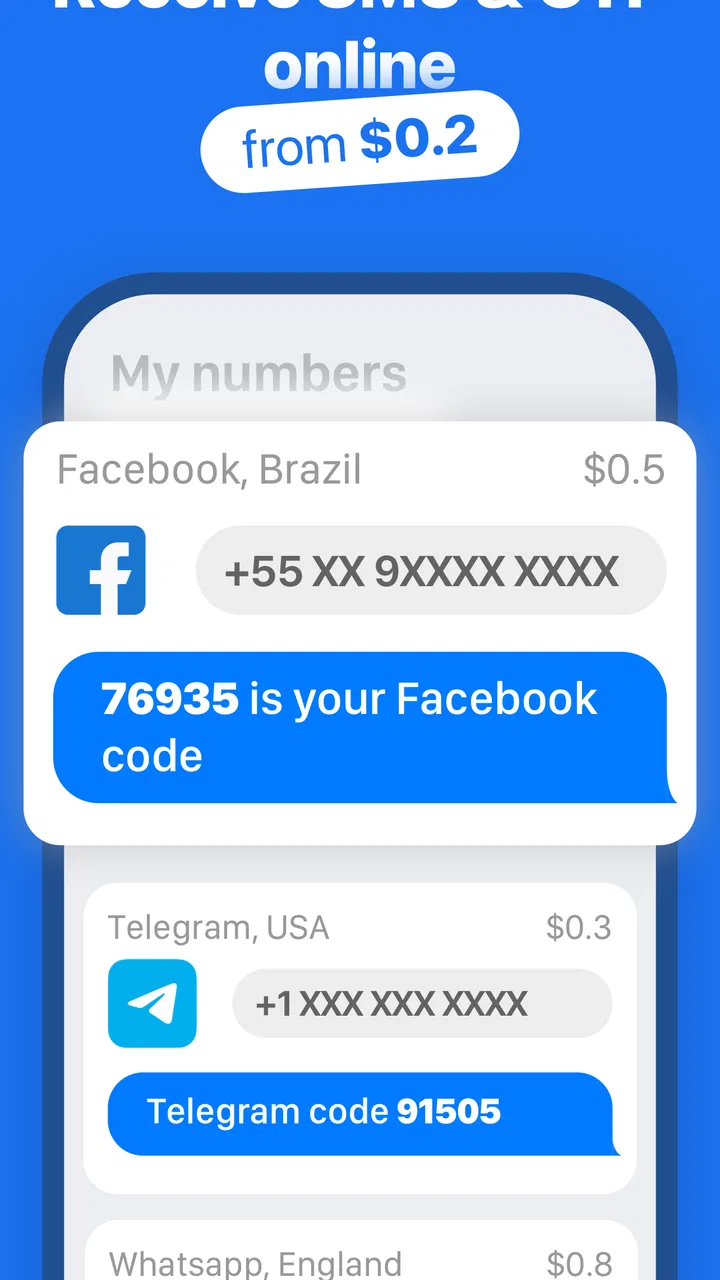
SMS Virtual - Receive SMS is an application designed to provide users with temporary phone numbers to receive SMS messages. This is particularly useful for privacy protection, online verification, and avoiding spam. Users select a number from a list of available options and can view incoming messages directly within the app.
02Is SMS Virtual - Receive SMS safe to use?
Yes, SMS Virtual - Receive SMS is designed with user privacy in mind. It offers temporary numbers, so your personal information remains secure. However, users should be cautious about sharing any sensitive data, as these numbers are often recycled and used by multiple users.
03Can I use SMS Virtual - Receive SMS for all types of verification?
While SMS Virtual - Receive SMS is effective for most online verifications, some services may not accept virtual numbers. This typically occurs with banks and government agencies, which might require a permanent number. Always check the verification requirements of the service you are using.
04Do I have to pay to use SMS Virtual - Receive SMS?
SMS Virtual - Receive SMS offers both free and paid options. The free version provides limited access to temporary numbers, while the paid version offers more features like exclusive numbers, longer availability, and ad-free experience. Users can choose the plan that best suits their needs.
05Are there any limitations to using SMS Virtual - Receive SMS?
Yes, there are a few limitations. Some services may block virtual numbers, and the availability of numbers can fluctuate based on demand. Additionally, messages can only be received, not sent, and the temporary numbers are shared among users, which could impact privacy and reliability.
Pros
- Easy to use interface for quick access.
- Supports multiple countries and numbers.
- No registration required to receive SMS.
- Fast delivery of messages.
- Offers temporary numbers for privacy.
Cons
- Limited free usage; premium plans needed.
- Some numbers may be unavailable at times.
- Not suitable for permanent SMS needs.
- Ads can be intrusive in free version.
- Occasional delays in message reception.

SMS Virtual - Receive SMS
Gallery